


Invoice Simple: Invoice Maker
4.822.06K Reviews
App Specs
- Version
- 6.10.0
- Updated On
- License
- Free
- Downloads
- 5,000,000+
- Developer
- Invoice Simple
- Categories
- Business
- Platform
- Android, iOS
Screenshots
 Analysis by AppCompare
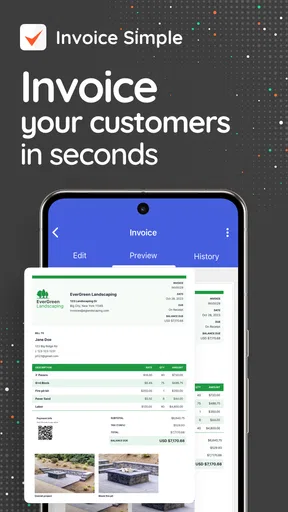
Ever found yourself buried under a mountain of paperwork trying to manage your invoices? Well, let me introduce you to the game-changer: the Invoice Simple: Invoice Maker app. This nifty little tool is designed to make your invoicing hassle-free, and trust me, it does just that.
Getting Started with Invoice Simple
So, I decided to give the Invoice Simple: Invoice Maker a whirl, and setting it up was a breeze. You simply download it from the App Store or Google Play, and you're good to go. The interface is clean and user-friendly, which means you won't be scratching your head trying to figure things out. The app walks you through creating your first invoice with a step-by-step guide that even a newbie can follow.
Features That Make It Stand Out
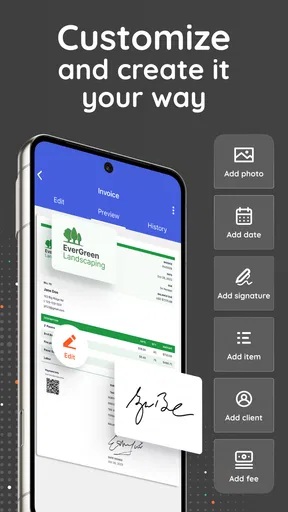
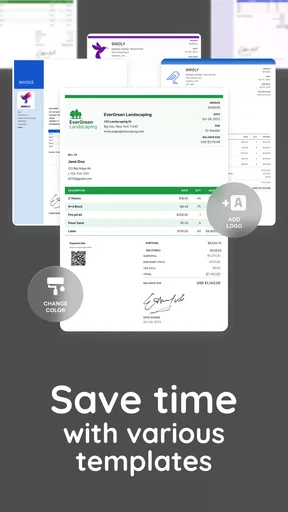
Let’s dive into what makes this app a must-have for freelancers and small business owners. First off, the customization options are top-notch. You can choose from various templates, and easily add your business logo, branding colors, and even your signature. This means your invoices can look professional without having to hire a designer.
Another feature I particularly love is the app’s ability to track expenses. With a few taps, you can log your business expenses, attach receipts, and even categorize them for easy access later. It's like having a mini-accountant in your pocket. Plus, you can convert estimates into invoices with just one click, which is super handy when you're on the go.
Seamless Payment Integration
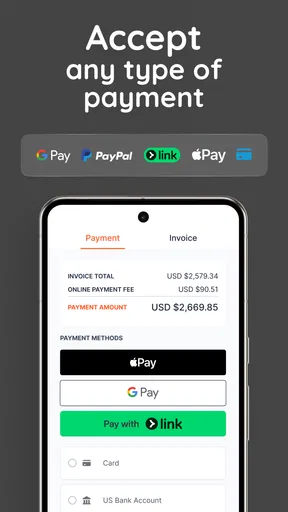
Getting paid is crucial, right? The app integrates with popular payment gateways like PayPal and Stripe, making it easier for clients to pay you. This feature can significantly reduce the time it takes to get your hard-earned money into your account. You can also set up automatic reminders for those clients who need a little nudge to pay on time.
Accessibility and Cloud Sync
One of the biggest perks of using the Invoice Simple: Invoice Maker is its cloud sync capability. Your invoices and records are stored securely, and you can access them from any device. Whether you’re on your phone, tablet, or computer, your data is just a login away. This is especially useful if you're traveling or working remotely.
User Experience and Support
The app’s user experience is smooth sailing. Navigation is intuitive, and I didn’t experience any lag or crashes during my tests. If you ever find yourself in a pickle, their customer support is responsive and helpful. They’ve got a comprehensive FAQ section and email support that typically responds within a day.
Worth Reading Before You Choose

EA SPORTS FC Mobile 26 Is a Bigger Football Game, but It Takes Time

Flipboard Shows What News Apps Must Do Beyond the Feed

Switching to Android Auto Means Rethinking Your Driving Routine

Google Calendar Makes a Crowded Week Easier to Manage

Ludo King Makes the Most of the Minutes Between Plans

Baby Panda World Brings Quick Play to Modern Phones, but Its Game Library Feels Busy
For those who crave a little extra, there’s a premium version that unlocks additional features like advanced reporting, more templates, and multi-currency support. It’s worth considering if your business is growing and you need more robust tools.
Final Thoughts
All in all, the Invoice Simple: Invoice Maker is a solid choice for anyone looking to simplify their invoicing process. It’s packed with useful features that make managing invoices and expenses a breeze. The app is straightforward, efficient, and helps keep your financial matters organized. If you’re tired of dealing with clunky invoicing systems, give this app a shot—it might just be the solution you’ve been searching for.
Ready to take control of your invoices? You can download the app and start experiencing the magic for yourself. Happy invoicing!
Pros
- User-friendly interface
- easy for beginners.
- Customizable templates enhance branding.
- Supports multiple currencies and languages.
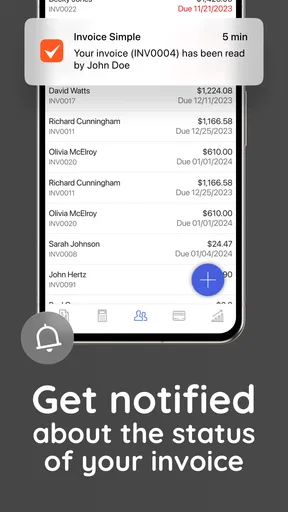
- Real-time notifications for invoice status.
- Secure cloud storage for data backup.
Cons
- Limited free version features
- upgrade needed.
- Occasional sync issues across devices.
- Lacks advanced reporting tools.
- No phone support
- email only.
- Subscription model may be costly for some.
FAQs for Invoice Simple: Invoice Maker
What features does Invoice Simple: Invoice Maker offer?
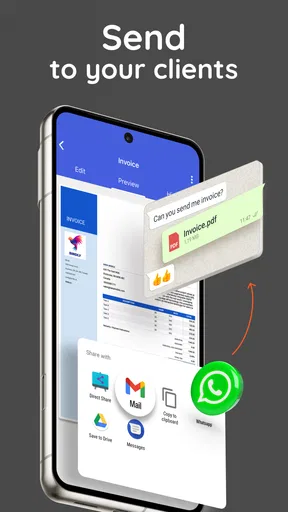
Invoice Simple provides a comprehensive range of features including customizable invoice templates, the ability to create and send invoices quickly, and track their status. Users can also generate detailed reports, accept payments through various methods, and manage clients efficiently. The app is designed to streamline invoicing for freelancers and small businesses.
Is Invoice Simple suitable for small businesses and freelancers?
Yes, Invoice Simple is ideal for small businesses and freelancers. It offers user-friendly tools to create professional invoices without the need for extensive accounting knowledge. The app is designed to save time and simplify the invoicing process, making it an excellent choice for those who need efficient financial management.
Can I use Invoice Simple on multiple devices?
Invoice Simple supports cross-device usage, allowing you to access your invoices and account information on both Android and iOS devices. This feature ensures flexibility and convenience, enabling you to manage your invoicing tasks from anywhere, whether you’re at the office or on the go.
Does Invoice Simple integrate with payment methods?
Yes, Invoice Simple integrates with various payment methods, allowing your clients to pay invoices directly through the app. This includes popular options like credit card payments, making it easier for you to receive payments quickly and securely, enhancing the overall efficiency of your financial operations.
Is there a free version of Invoice Simple available?
Invoice Simple offers a limited free version with basic features for users who need minimal invoicing capabilities. However, to unlock all advanced features, a subscription to the premium version is required. This allows users access to more comprehensive tools and customization options, enhancing the app’s functionality.


